Download Developing AI-Enabled Database Solutions.DP-800.PassLeader.2026-09-09.54q.vcex
| Vendor: | Microsoft |
| Exam Code: | DP-800 |
| Exam Name: | Developing AI-Enabled Database Solutions |
| Date: | Sep 09, 2026 |
| File Size: | 3 MB |
How to open VCEX files?
Files with VCEX extension can be opened by ProfExam Simulator.
Discount: 20%

Demo Questions
Question 1
You need to design a generative AI solution that uses a Microsoft SQL Server 2025 database named DB1 as a data source. The solution must generate responses that meet the following requirements:
- Are grounded in the latest transactional and reference data stored in DB1
- Do NOT require retraining or fine-tuning the language model when the data changes
- Can include citations or references to the source data used in the response
Which scenario is the best use case for implementing a Retrieval Augmented Generation (RAG) pattern? More than one answer choice may achieve the goal. Select the BEST answer.
- summarizing free-form user input text
- training a custom language model on historical database data
- answering user questions based on company-specific knowledge
- generating marketing slogans based on user sentiment analysis
Correct answer: C
Explanation:
Implementing a Retrieval-Augmented Generation (RAG) pattern with Microsoft SQL Server 2025 allows you to ground generative AI responses in real-time company data without the need for model fine-tuning. This version of SQL Server functions as a native vector database, enabling seamless integration between relational data and AI-powered insights. Incorrect: [Not B] Training a custom language model is not a use case for the Retrieval Augmented Generation (RAG) pattern. In fact, the primary purpose of RAG is to provide a language model with up-to-date information without the need for training, retraining, or fine-tuning. Reference: https://devblogs.microsoft.com/azure-sql/sql-server-2025-embraces-vectors-setting-the-foundation-for-empowering-your-data-with-ai
Question 2
Which service enables natural language querying over SQL data?
- Azure Data Factory
- Azure Synapse Analytics
- Azure OpenAI Service
- Azure Blob Storage
Correct answer: C
Explanation:
Azure OpenAI Service allows users to query structured SQL data using natural language via LLMs.
Question 3
What is a key benefit of embedding vectors in SQL databases?
- Faster backups
- Improved indexing
- Semantic search capability
- Reduced storage
Correct answer: C
Explanation:
Vector embeddings enable similarity search, allowing semantic queries beyond exact matches.
Question 4
Your team is developing an Azure SQL dataset solution from a locally cloned GitHub repository by using Microsoft Visual Studio Code and GitHub Copilot Chat.
You need to disable the GitHub Copilot repository-level instructions for yourself without affecting other users.
What should you do?
- From Visual Studio Code, modify your GitHub Copilot Chat user settings.
- Add a --debug flag when you start the GitHub Copilot Chat extension.
- Delete .github/copilot-instructions.md.
Correct answer: A
Explanation:
To disable GitHub Copilot repository-level instructions for yourself without affecting others, you can modify your User Settings in Visual Studio Code. This allows you to override or ignore specific repository-wide configurations like copilot-instructions.md at a personal level. How to Disable Repository-Level Instructions 1. Open User Settings: Press Ctrl+, (Windows/Linux) or Cmd+, (macOS) to open the VS Code Settings editor. 2. Search for Copilot Chat: In the search bar, type github.copilot.chat.customInstructions. 3. Configure Custom Instructions: Find the setting for Github > Copilot > Chat: Custom Instructions. Ensure the User tab is selected at the top to apply changes only to your account and not the shared workspace. 4. Toggle via Chat UI: Open the Chat view (Ctrl+Alt+I or Cmd+Shift+L). Click the Configure Chat (gear icon) at the bottom of the chat panel. Select the Instructions tab and uncheck or remove any active repository-level files to disable their influence on your session. Reference: https://code.visualstudio.com/docs/copilot/customization/custom-instructions
Question 5
You have a SQL database in Microsoft Fabric that contains a column named Payload. Payload stores customer data in JSON documents that have the following format.
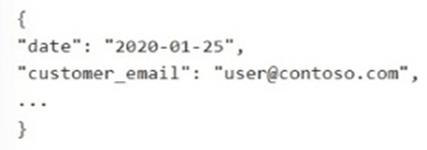
Data analysis shows that some customers have subaddressing in their email address, for example, user1+promo@contoso.com.
You need to return a normalized email value that removes the subaddressing, for example, user1 +promo@contoso.com must be normalized to user1@contoso.com.
Which Transact-SQL expression should you use?
- REGEXP_REPLACE(JSON_VALUE(Payload, ‘$.customer_email’), ‘\+.*$’, ‘’)
- REGEXP_SUBSTR(JSON_VALUE(Payload, ‘$.customer_email’), ‘^[^+]+@.*$=’)
- REGEXP_REPLACE(JSON_VALUE(Payload, ‘$.customer_email’), ‘\+.*@’, ‘@’)
- REGEXP_REPLACE(JSON_VALUE(Payload, ‘$.customer_email’), ‘\+.*’, ‘’)
Correct answer: C
Explanation:
In a Microsoft Fabric SQL database, you can use the REGEXP_REPLACE function (introduced as part of the SQL Server 2025/Always-up-to-date engine updates) to normalize email subaddresses. Solution using REGEXP_REPLACE The command you proposed correctly extracts the email string from the JSON document and applies a regular expression to strip the plus-sign subaddress. SELECT REGEXP_REPLACE(JSON_VALUE(Payload, '$.customer_email'), '\+.*@', '@') AS NormalizedEmail FROM YourTable; Breakdown of the Command JSON_VALUE: Efficiently extracts the customer_email as a scalar string from your Payload column. REGEXP_REPLACE: Searches for the pattern \+.*@ (a literal plus sign followed by any characters until an @) and replaces that entire matched segment with just @. Native Support: Unlike older versions of SQL Server that required complex CHARINDEX and SUBSTRING workarounds, Fabric SQL databases now include this modern regex functionality. Reference: https://devblogs.microsoft.com/azure-sql/exciting-new-t-sql-features-regex-support-fuzzy-string-matching-and-bigint-support-in-dateadd-preview/
Question 6
You have an Azure SQL database.
You deploy Data API builder (DAB) to Azure Container Apps by using the mcr.microsoft.com/azure-databases/data-api-builder:latest image.
You have the following Container Apps secrets:
- MSSQL_CONNECTION_STRING that maps to the SQL connection string
- DAB_CONFIG_BASE64 that maps to the DAB configuration
You need to initialize the DAB configuration to read the SQL connection string.
Which command should you run?
- dab init --database-type mssql --connection-string “secretref:DAB_CONFIG_BASE64” --host-mode Production --config dab-config.json
- dab init --database-type mssql --connection-string “@env(‘MSSQL_CONNECTION_STRING’)” --host-mode Production --config dab-config.json
- dab init --database-type mssql --connection-string “secretref:mssql-connection-string” --host-mode Production --config dab-config.json
- dab init --database-type mssql --connection-string “@env(‘DAB_CONFIG_BASE64’)” --host-mode Production --config dab-config.json
Correct answer: B
Explanation:
To initialize the Data API builder (DAB) configuration to read the SQL connection string from your Container Apps secret, use the following dab init command: dab init --database-type mssql --connection-string "@env('MSSQL_CONNECTION_STRING')" Why this command works --database-type mssql: Specifies that you are connecting to an Azure SQL or SQL Server database. @env('MSSQL_CONNECTION_STRING'): This is the built-in DAB function that tells the runtime to substitute the value of the specified environment variable at load time. Since your Container Apps secret is mapped to MSSQL_CONNECTION_STRING, DAB will resolve it automatically when the container starts. --connection-string: This flag sets the data source connection. By using the @env() syntax here, you ensure the secret remains out of the static configuration file. Reference: https://learn.microsoft.com/en-us/azure/data-api-builder/command-line/dab-init
Question 7
You have an Azure SQL database that contains database-level Data Definition Language (DDL) triggers, including a trigger named ddl_Audit.
You need to prevent ddl_Audit from firing during the next deployment. The trigger object must remain in place.
Which Transact-SQL statement should you use?
- ALTER TRIGGER
- ALTER DATABASE
- ALTER SERVER AUDIT SPECIFICATION
- DISABLE TRIGGER
- ALTER DATABASE AUDIT SPECIFICATION
Correct answer: D
Explanation:
The DISABLE TRIGGER Transact-SQL statement is the correct and appropriate solution for this scenario. Solution Breakdown To prevent a specific database-level DDL trigger from firing without removing the object, you can use the following syntax: DISABLE TRIGGER [TriggerName] ON DATABASE; Key Considerations Object Retention: A disabled trigger remains in the database as an object and is visible in catalog views like sys.triggers, but it will not execute when its programmed events occur. Reactivation: You can re-enable the trigger after your deployment is complete using the ENABLE TRIGGER statement. Permissions: To execute this command on a database-scoped DDL trigger in Azure SQL, you must have at least ALTER ANY DATABASE DDL TRIGGER permission. Reference: https://learn.microsoft.com/en-us/sql/t-sql/statements/disable-trigger-transact-sql
Question 8
You have an Azure SQL database that contains a table named Rooms. Rooms was created by using the following Transact-SQL statement.
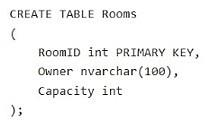
You discover that some records in the Rooms table contain NULL values for the Owner field.
You need to ensure that all future records have a value for the Owner field.
What should you add?
- a foreign key
- a check constraint
- a nonclustered index
- a unique constraint
Correct answer: B
Explanation:
A CHECK constraint is one way to do it. If you use a CHECK constraint (e.g., CHECK (ColumnName IS NOT NULL)), the database will indeed reject new NULL entries. However, the column's metadata will still technically allow NULLs, which can sometimes affect how external tools or APIs interact with your schema. Reference: https://www.postgresql.org/docs/7.0/sql-createtable.htm
Question 9
You have a Microsoft SQL Server 2025 instance that has a managed identity enabled.
You have a database that contains a table named dbo.ManualChunks. dbo.ManualChunks contains product manuals.
A retrieval query already returns the top five matching chunks as nvarchar(max) text.
You need to call an Azure OpenAI REST endpoint for chat completions. The solution must provide the highest level of security.
You write the following Transact-SQL code.
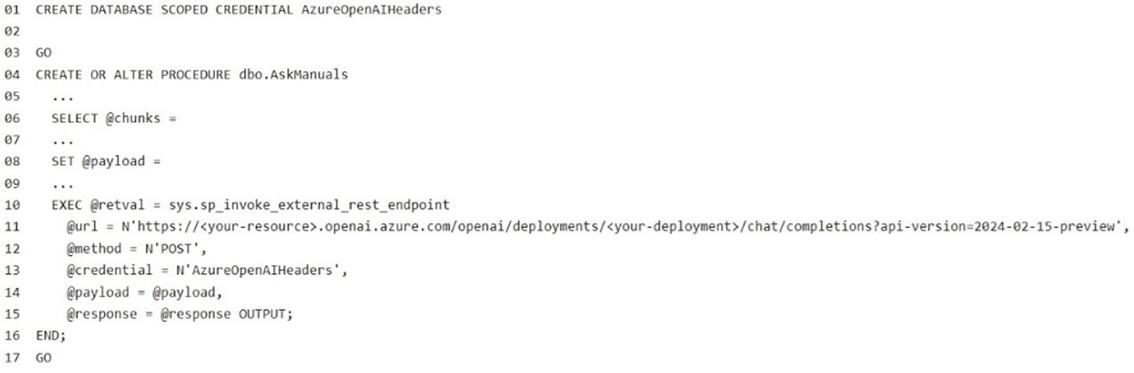
What should you insert at line 02?





Correct answer: B
Explanation:
To use a Managed Identity with sys.sp_invoke_external_rest_endpoint in SQL Server, you need to configure your database-scoped credential with the following specific values: Required Settings WITH IDENTITY: Must be set to Managed Identity. SECRET: Must be set to SECRET = N'{"resourceid":"<value>"}'. Example Statement CREATE DATABASE SCOPED CREDENTIAL [MyManagedIdentityCredential] WITH IDENTITY = 'Managed Identity', SECRET = N'{"resourceid": "https://azure.com"}'; -- Or your specific resource URI Quick Breakdown Identity: Managed Identity tells SQL Server to use the instance's assigned Azure identity rather than a static key or token. Secret: The resourceid inside the JSON string specifies the Audience (resource) for which the Managed Identity is requesting an access token (e.g., Azure Storage, Key Vault, or a custom API). Reference: https://learn.microsoft.com/en-us/azure/azure-sql/managed-instance/authentication-azure-ad-user-assigned-managed-identity-create-managed-instance
Question 10
What is Retrieval-Augmented Generation (RAG)?
- A backup strategy
- A query optimization technique
- Combining LLMs with external data sources
- A SQL indexing method
Correct answer: C
Explanation:
RAG enhances LLM responses by retrieving relevant SQL data before generating answers.
Question 11
You have a GitHub Codespaces environment that has GitHub Copilot Chat installed and is connected to a SQL database in Microsoft Fabric named DB1. DB1 contains tables named Sales.Orders and Sales.Customers.
You use GitHub Copilot Chat in the context of DB1.
A company policy prohibits sharing customer Personally Identifiable Information (PII), secrets, and query result sets with any AI service.
You need to use GitHub Copilot Chat to write and review Transact-SQL code for a new stored procedure that will join Sales.Orders to Sales.Customers and return customer names and email addresses. The solution must NOT share the actual data in the tables with GitHub Copilot Chat.
What should you do?
- From Sales.Customers, paste several rows that include email addresses into a chat, so that GitHub Copilot Chat can infer edge cases.
- Run a SELECT statement that returns customer names and email addresses and provide the result set to GitHub Copilot Chat so that GitHub Copilot Chat can generate the stored procedure.
- Provide the database connection string to GitHub Copilot Chat so that GitHub Copilot Chat can validate the stored procedure.
- Ask GitHub Copilot Chat to generate the stored procedure by using schema details only.
Correct answer: D
Explanation:
To use GitHub Copilot Chat effectively in this environment without exposing sensitive data, you should focus your prompts entirely on the schema and logic rather than the data itself. Since Copilot Chat can "see" your open files, the best approach is to provide the table structures as DDL (Data Definition Language) statements or a simplified description. Steps to generate the stored procedure: Define the Schema: Open a new SQL file in your Codespace. Paste the CREATE TABLE scripts (without any data) for your two tables. Prompt Copilot: Use the Chat view to request the procedure. Example Prompt: "Based on the table definitions in my open file, write a T-SQL stored procedure that joins TableA and TableB on [Join Column]. Include logic to filter by [Parameter] and ensure no PII columns are included in the SELECT statement." Review for PII/Secrets: Before executing, manually verify that the generated code doesn't include hardcoded secrets or call PII columns you intended to omit. Security Check: Because you are in a Codespace, ensure your .env files or connection strings are in your .gitignore so they aren't indexed by Copilot. Reference: https://github.com/orgs/community/discussions/141924
HOW TO OPEN VCE FILES
Use VCE Exam Simulator to open VCE files
HOW TO OPEN VCEX AND EXAM FILES
Use ProfExam Simulator to open VCEX and EXAM files
ProfExam at a 20% markdown
You have the opportunity to purchase ProfExam at a 20% reduced price
Get Now!